


PROJECT: ARPG
A solo project developed at Futuregames as my graduation project. I wanted to challenge myself with a Top Down Level Design. I also wanted to create a project by myself to see what my limitations were and how much I could learn and develop in 3 weeks.
Length
3 Weeks
Genre
Top Down
ARPG
Team
Solo Project

Unreal 5.3

Blueprints
Assets
From Epic Games
Character Model, Animations & VFX
Paragon: Shinbi
AI Models, Animations & VFX
Paragon: Minions
Environment Art
Paragon: Agora and Monolith
Terrain Material
Quixel
Vision
I aimed to create a Top Down Level Design with focus on verticality, encounter spaces, combat, level & ability progression. My main inspiration for the Level Design were Diablo 3 & 4 and Lost Ark. I also took inspiration from their level and ability progression.
Level Design
Levelmap To Blockout To Dress

I wanted to add the verticality in the map as well as encounter spaces and where the player would level up. I also wanted to use the verticality to show players treasures (which would become pickups) before players could get to them to encourage exploration.

For the blockout, I would need to deviate from the level map to ensure that the verticality did not disturb the camera. I would also add more paths to make the player able to see down from the higher verticality. I also added more enemies to make the player gain more levels, get their abilities earlier and feel stronger when they encountered the boss.

To make the blockout, I created a modular kit (walls, floors and ramps). It allowed me to cohesively create the gameplay area and design the encounter spaces. I could also add in verticality without too much complexity. I later on decided to keep the walls hidden in game and making them non-clickable. It allowed more freedom for the player to move around and gave them more vision.

I would then Level Dress using the blockout as the base. This allowed me to still use the blockout for movement while keeping it hidden.


An important aspect for the level was to show the player in advance a treasure they could pickup. I wanted to encourage exploration and later create separate paths that the player could choose to take. I also added a teleporter to bring players to the main path to remove unnecessary backtracking.


In this fork, I noticed players would often take a left rather than a right, missing out on a skill point pickup. I did not want to force players to take a right, rather I wanted to incentivize them. Therefore, I placed a few enemies on the right side. Most players would have a "ooh piece of candy" moments and walk to the right which would lead them to falling down and allowing them to get a pickup.

When players were on the path leading to the boss, they could see down from the higher verticality to give them a sense of the scale of the level. Players would also get a feeling of accomplishment as they looked back on what they had already passed through.

Boss Room
Ability Progression
To give a sense of progression, players would unlock abilities when they leveled up. They also gained more health and mana regeneration.
From this section and below are all the blueprints that I created.
(Blueprints for Levels, Ctrl + Scroll to Zoom, Right Click to Drag. You can also press Fullscreen on the top left to see it entirely)
Melee Attack
Basic Attack, Learned from Start

(Blueprints for Melee Attack - First is on the Player - Second is a BP that spawns (hitbox) that deals the damage)
Wolf Attack
Second Attack, Learned Level 2

(Blueprints for Wolf Attack - First is on the Player
Second is a BP that spawns an AI that runs, aggroes to enemies and deals damage)
AoE Attack
Third Attack - Learned Level 3

(Blueprints for AoE Attack - First is on the Player
Second is a BP that spawns a sphere on the player (hitbox), stuns enemies and deals damage)
Dash
Basic Ability - Learned from Start

(Blueprints for Dash - On the Player)
Ultimate Ability
Fourth Ability - Learned from defeating the Boss

(Blueprints for Ultimate Ability - On the Player)
Talent Tree
To further the sense of progression, players would also gain skill points from level ups and pickups. Players would be able to spend them on a Talent Tree to further increase the power of their abilities.
I wanted the players to make their own choice and allow them to have their own playstyle. Players could upgrade their Melee, Wolf, and AoE Attack. Spending 3 points on either would also unlock a special power for that attack.
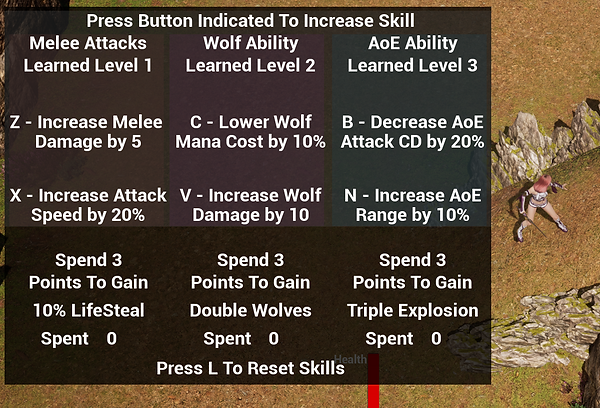
(Blueprints for the Talent Tree - On the Player)
(Blueprint for the Skill Point Pickup)
Melee Attack Upgraded

Spending 3 skill points into the Melee branch unlocks life steal on melee attacks
Wolf Attack Upgraded

Spending 3 skill points into the Wolf branch unlocks spawning double wolves
AoE Attack Upgraded
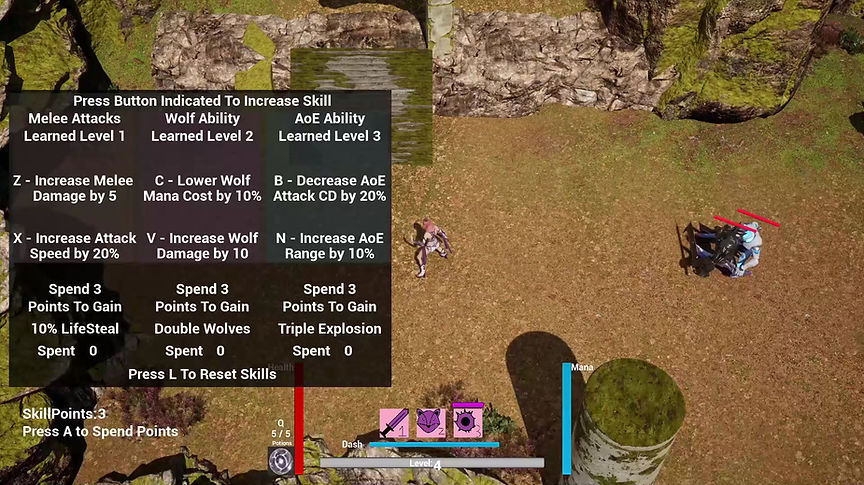
Spending 3 skill points into the AoE branch unlocks triple explosions
Player Attributes
Player Health, Potions & Taking Damage
(Blueprints for Taking Damage, Gaining Health, Gaining and Spending Health Potions, Dying & Reviving - On Player)
(Blueprint for Health Potion Pickup)
Player Mana, Regen & Spending
(Blueprint for Regenerating Mana and Spending Mana - On player)
Rotation Towards Mouse
(Blueprint for an Event to Rotate Player Towards the Mouse - On Player)
To allow the player a little bit more freedom and faster combat, I implemented a rotation towards mouse event. This event is called on other blueprints, main use being on the melee attack. This allows the player to be able to move and attack in opposite directions.
AI & Boss Design

I created 3 different AI's
Two Melee Variants - Normal & Strong
Two Range Variants - Normal & Strong
One Boss
Melee AI Behaviour

To start off, I created a flowchart of the most basic level of the AI Behaviour.
The AI uses a sphere to detect the player.
If the AI does not detect the player, it will roam around randomly in the navigable area.
If player gets into the sphere, it will start chasing the player.
If the player is close enough to the AI, the AI will attack the player.

(Behaviour Tree for the two Melee AI's)
(Blueprint to Attack the Player - On the AI)
(Blueprint to Detect Player (Overlaps) - On the AI)
(Blueprint for Stunning the AI - On the AI)
(Blueprint for the AI taking damage - On the AI)

Range AI Behaviour
The Range AI was created as a child of the Melee AI, inheriting most of the behaviour. However, I would change its behaviour tree to fit its Ranged functionality.
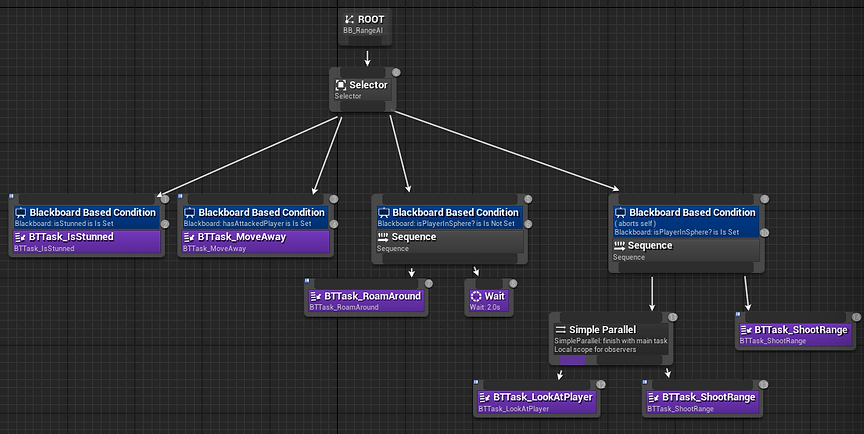
(Behaviour Tree for the two Range AI's)
(Blueprint for Attacking the player - On the Range AI)
(Blueprint to Rotate Towards Player - On the Range AI
To ensure the AI Rotates correctly to the player when attacking)

Boss Behaviour
The Boss AI was also created as a child of the Melee AI.
It inherited most of the behaviour, however I changed its behaviour tree and added more functionality to create the boss fight.

(Behaviour Tree for the Boss AI)
(Blueprint for the Boss AI to use its Aoe Stun Attack - On the Boss AI)
(Blueprint for the AoE Stun Attack Hitbox)

Gets Activated when Boss is at 50% HP
(Blueprint for the Boss AI to use its Charge Attack - On Boss AI)
(Blueprint for the Charge Attack HitBox)

(Blueprint for the Boss AI taking damage and events based on taking damage - On Boss Ai)
(Blueprint for events based on Boss Health - On Boss Ai)
(Blueprint for Boss overlaps and resetting if player dies - On Boss Ai)
Hazards
I also created Hazards that were placed in the level.
Static Shooters

(Blueprint for StaticShooters)
(Blueprint for StaticShooter HitBox that deals damage)
Spike Traps

(Blueprint for Spike Traps)
What I have Learned
Creating a top down level using verticality is... quite challenging, but it was a fun challenge to tackle. I needed a different thought of process when trying to show points of interests from a top down perspective. Leading the players also needed a different approach than a first- or third-person camera, as the player had much more of the camera space to wander around.
Verticality was also tricky for the camera. I wanted certain objects to show in the camera that were closer to the camera but still feel distant from the player. Therefore, I had to understand the metrics and distance of objects that I could place out in a higher verticality. Otherwise, objects might have blocked the cameras vision and make the players disoriented.
I have also gained a deeper understanding of blueprints. I am happy that I managed to create the amount of work in the short amount of time I had. This project has definitely made me more confident with visual scripting.
I also learned a lot about AI and that it is hard to get the intended behaviour. The AI needed to work well for the fast paced level I wanted. It took the most time to polish and get a good feeling for, especially the boss with its two main mechanics.